
JJSplit
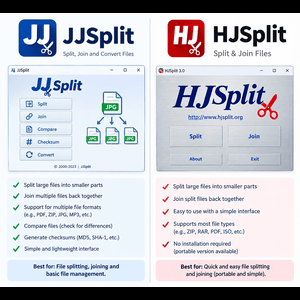
JJSplit is a file splitter developed in Java language. It is used to split large files into small files. It is the best option to transfer the larger files on the internet. If you want to join or split your files with some clicks, just hit the download button.
JJSplit Overview
JJSplit is a simple and efficient tool that lets you break large files into smaller pieces and merge them back effortlessly. It was developed by vigneshwaranr. It is free software and is available in the English language. This tool works efficiently on Windows, Linux, and Mac.
You can easily split and join any file using this tool. If you want to split a file, just open the JJSplit on your desktop. Select the option “Split” and choose the file to split down. Then, set the size for each split part. Set the save location and click on the “Start” button to split the file.
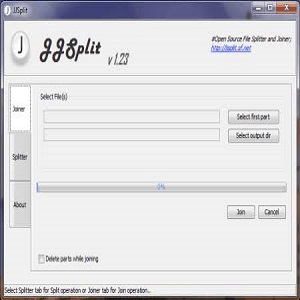
You can also easily join the split parts of the file. To join the files, click on the “Join” option in JJSplit. Then, choose the split parts of the file, like .001 and .002. Click on the “Start” button to join all parts of the file. It also offers a “double-click” option to join the files automatically. Ever tried sending a huge file only to get blocked by size limits? Yeah, we’ve all been there. That’s exactly where JJSplit steps in like a digital superhero. If you’re searching for JJSplit free download, you’re probably looking for a simple, no-nonsense way to split and join files without jumping through hoops. JJSplit has been around for years, quietly doing its job while flashy tools come and go. It doesn’t scream for attention, but it gets the work done—and sometimes, that’s all you need.
Key Features
You can join the file parts with a click.
Any time can delete the joined or split file parts.
It supports joining .001 and .002 files.
Capable of doing multi-threaded operations.
It has a portable feature. You can run it directly from a USB device.
It has a simple and easy-to-use interface.
Steps to Install JJSplit on your Desktop
- Open the web browser and search for the JJSplit.
- Click the download button on the website.
- Once the JJSplit file is downloaded, click on the file to start the installation.
- After the successful installation you can use this program.
JJSplit Free Download – Is It Really Free?
Certainly. JJSplit is completely free software. No hidden fees, trial periods, or premium upgrades will abruptly arise later.
Is JJSplit Secure for Use?
Certainly, as long as it is acquired from a credible source. It is free from spyware, malware, or adware. Steer clear of questionable third-party websites replete with fraudulent download buttons.
System Requirements for JJSplit
Windows Compatibility
JJSplit functions effortlessly on:
Windows XP, Windows 7, Windows 8, Windows 10, Windows 11
Storage and Memory Specifications
Fundamental requirements:
A small quantity of storage space measured in megabytes
Essential RAM accessibility
In conclusion, if your PC is functional, it can run JJSplit.
Guidelines for Obtaining JJSplit :
Authorized Sources vs. Tertiary Websites
Consistently highlight credible or established software repository websites. They provide unmodified pristine versions.
Download JJSplit
| Software Name | JJSplit |
| Publisher | vigneshwaranr |
| File Size | 535.9 KB |
| Language | English |
| Category | System Utilities |
| Operating System | Windows, Mac, Linux |
| Downloads | 1,645 |
Conclusion
JJSplit is a specially designed software that is used to split and join large files. You can break large files into several smaller ones with ease. It makes it simpler to manage, transfer, and store them without any hassle. These files can also be joined as a single file. All this process can easily be done with some clicks. It is a small and portable software that you can use anywhere without installing it. So, if you work with large files then you must use this software. If you’re looking for a simple, free, and reliable file splitter, JJSplit free download is still a solid choice. It doesn’t try to impress—it just works. Like a trusty old toolbox, it’s always there when you need it. Whether you’re a casual user or a tech-savvy pro, JJSplit gets the job done without breaking a sweat.